





About
Here you will find all the information you need to start your rotation and function on shift! Please ask questions of your attendings or senior EM residents on your first few shifts to help get you oriented.
Day One
Transportation and Parking
- Badging and parking office is located in Central Tower 1CT-153 on the first floor in the hallway connecting center and west towers (206-744-3254)
- You will need a parking permit to park at the staff garages (P3 at the Pat Steel Building or P4 on Boren Ave). Parking in the Ninth and Jefferson Building garage (P1) is free via staff badge access for evening shifts (starting after 4:30 PM) and on the weekends and holidays.
- Bicycle lockers: you can lock your bike up outside the main entrance on 9th Ave or request access to the bike cage in the Ninth and Jefferson Building garage on level A (email hmcpark@uw.edu for access)
EPIC
- You must complete the EPIC training at least two weeks before the start of your rotation in order to gain access to the ED Epic Workspace.
- In particular, EPIC access has been difficult to obtain on short notice for residents rotating from SWEDISH and MADIGAN.
- The Emergency Department context looks very different from the inpatient or outpatient contexts
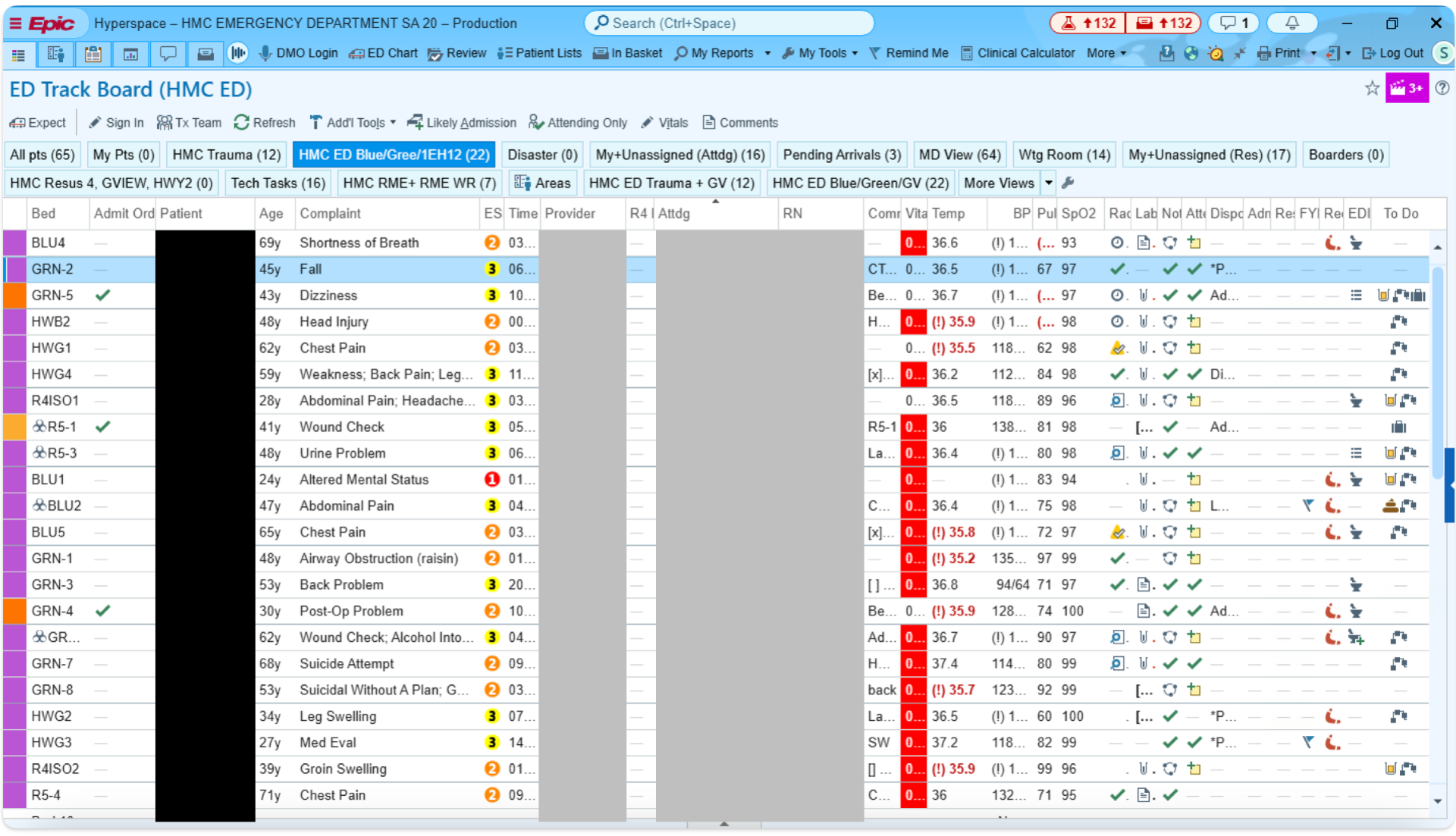
ED Track Board Complete View
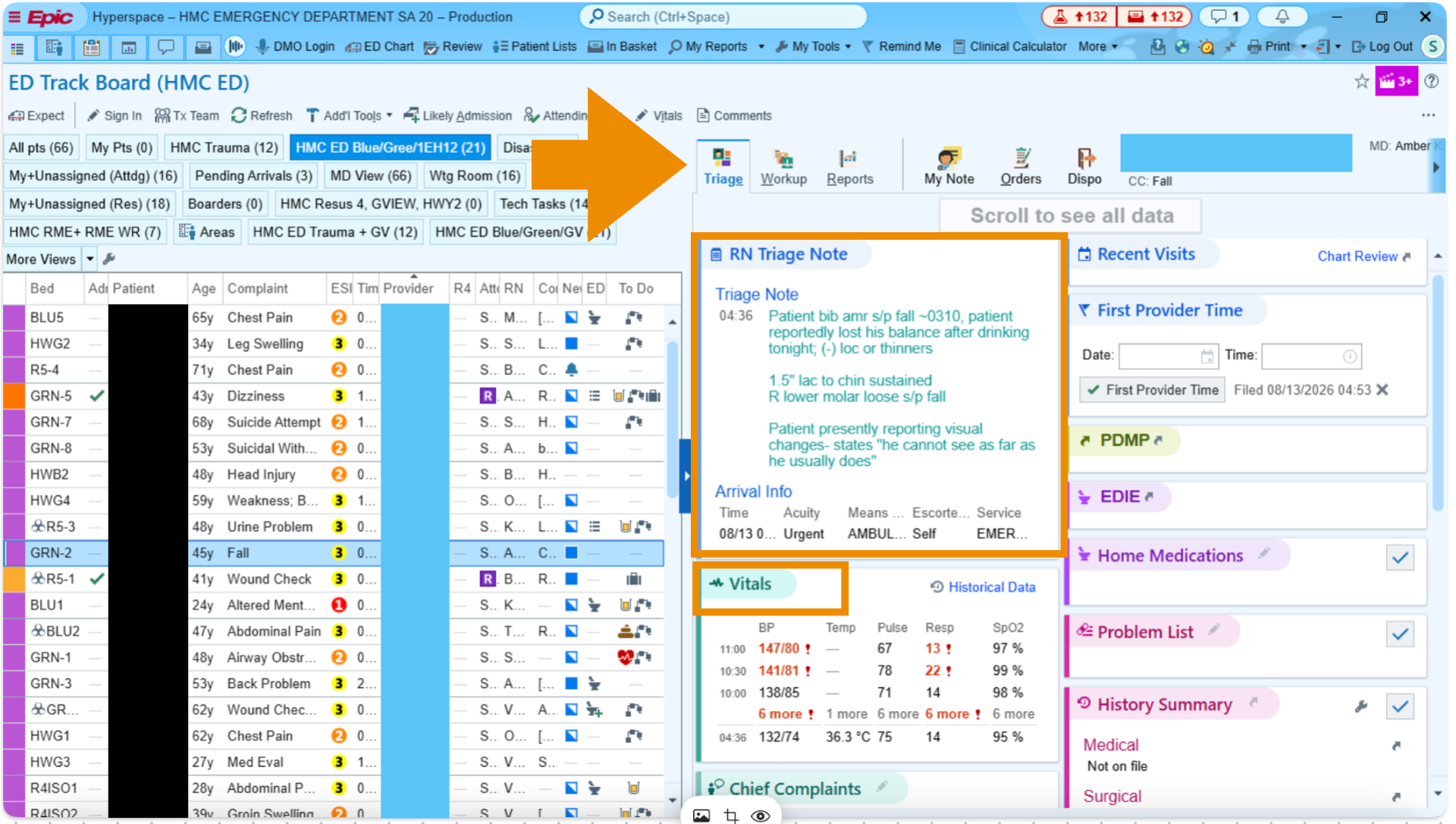
ED Track Board, Split View
ED providers often use the "Split View" for multitasking! This view can be helpful to keep an eye on new patients arriving on the board, while monitoring their existing patients. The Triage tab is helpful to look at initial vitals and presenting story before going to see the patient.
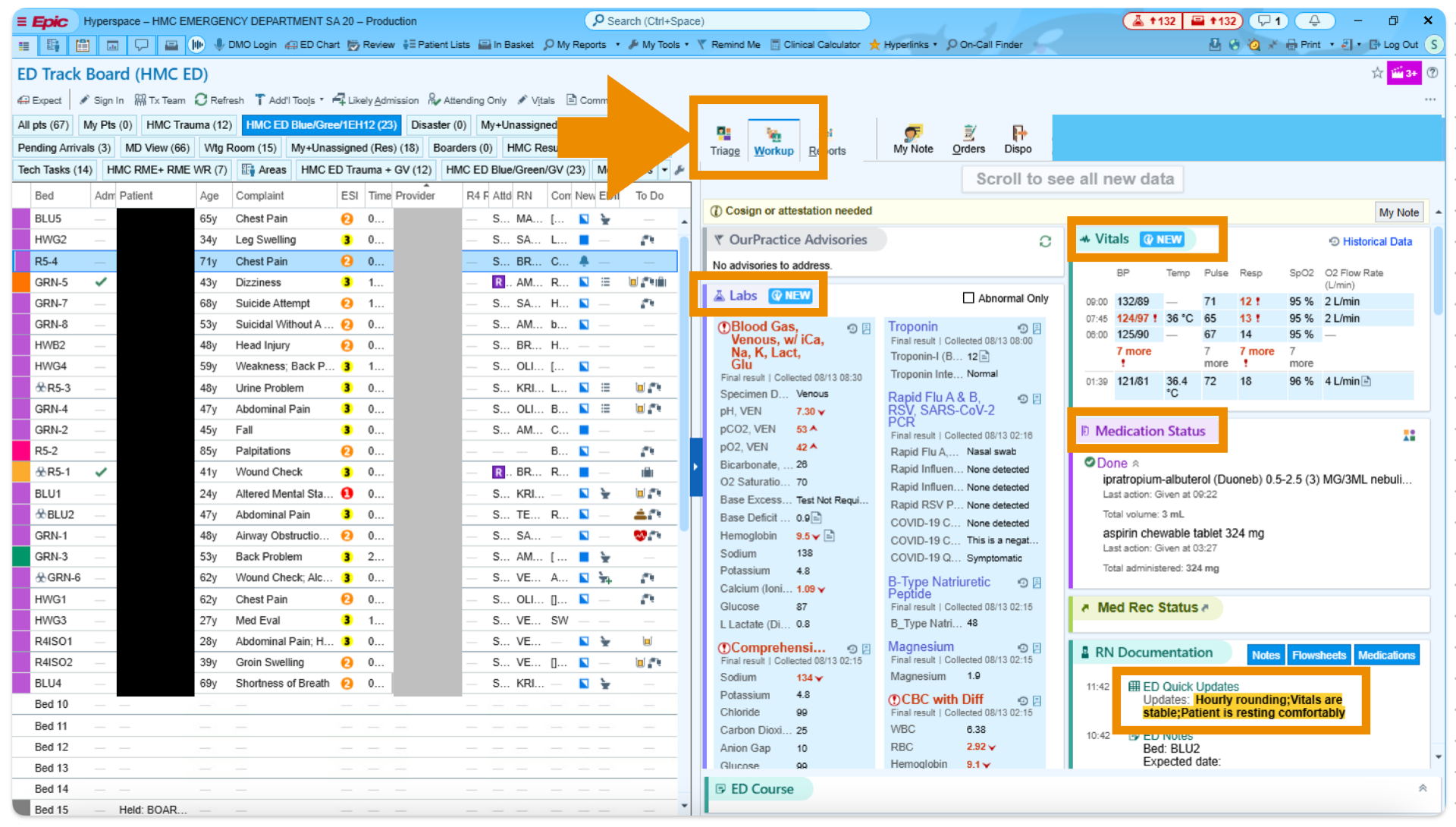
Also in the split view, the Workup tab is helpful to look at lab/imaging results, medications, and nursing notes in real time.
Where to Store Your Stuff
- You can also keep your belongings near the physician work stations in the cabinets above the computers or the cabinet under the printers at HMC. At UWML, there is a shelf in the physician work cubby where you can leave your things. Please do not bring valuables to work.
What to Wear
- Wear scrubs. You can get clean scrubs from the locker rooms at both HMC and UWML. Lockers at HMC are in the back hallway, accessed by badge at the door next to the Social Workers. The locker rooms have codes to access them - please ask an attending or EM resident for the locker room code. Lockers at UWML are located in the side hallway next to the waiting room, accessible by badge only. White coats are not expected.
Bathrooms
- Staff bathrooms at HMC are in the back hallway, accessed by badge at the door next to the social workers. Please ask an attending or senior EM resident for the bathroom code.
- At UWML, the staff bathroom is in the back hallway near the physician work fishbowl. Please ask an attending or senior EM resident for the bathroom code. There are also bathrooms in the locker rooms, which are accessible by badge.
Food
- Please feel free to take a quick 5-10 minute break to grab food on your shift! Just let your attending know that is where you are going and make sure that you have seen all the patients you have signed up for and workups have been started.
- The HMC cafeteria is closest place to get food. It is located on the basement floor, easily accessible by the West elevators/stairs toward the back of the emergency department (near the CT scanners and the orthopedic surgery store room). Diva café is another good option – it is across the street from HMC in the Ninth and Jefferson building.
- At UWML, the cafeteria is the Plaza café, which is located in the Pacific tower on the 1st floor . The café is the closer place to grab food, which is on the 3rd floor near the skybridge to the surgical pavilion, right above the ED.
Shift Structures
Starting a Shift and Sign-out
- Group sign-out occurs at 6 am, 2 pm, and 10 pm at HMC in the Blue Zone for medicine and in the trauma fishbowl for trauma
- There may be group sign out at these times at UWML depending on attending preference
- Please arrive 10 minutes prior to the beginning of your shift to be fully prepared for sign-out
- Pick up a work phone (please ask an EM resident for the phone codes)
- Log into an available computer and use the “sign in” feature on Epic to sign in with your work phone number (on the back of the phone)
- Do not list a supervisor when you sign in
- “Signing out” your patient entails giving a brief synopsis of the patient’s chief complaint, their acuity, pertinent visit information, and pending tasks and anticipated disposition.
- For non-dyad residents (any shift that does not begin at 6 am, 2 pm, or 10 pm), sign-out occurs at the end of the scheduled shift time (ie. for the 10a-6p shift, sign-out will occur at 6 pm). You may sign-out your patients to an oncoming non-dyad resident, but also may sign-out to the senior or junior dyad resident. It is recommended to stop singing up for patients 30 minutes prior to your sign-out time to ensure you have had adequate time to staff the patient with an attending.
- If you are taking sign-out on a patient, document the sign out in the ED course in the workup tab. Example: “Receiving sign-out from resident Dr. Smith. 40F stable patient presenting with chest pain, history of CAD s/p DES x 2. EKG nonischemic, CXR unremarkable, pending repeat troponin and reassessment.”
- Please also document updates and eventual disposition in the ED course for any patients for whom you have taken sign-out
General Shift Expectations
- Arrive to your shift 10 minutes before the start of your shift and identify yourself and whom you are taking sign-out from if applicable
- Pick up patients as they become available. Once a patient is roomed and ready to be seen their triage box color will turn from navy blue to hot pink. Right click on the patient and click “assign me” to sign up for the patient.
- Aim to see approximately 1 patient per hour or more depending on patient complexity and your comfort level.
- See your patients as soon as possible. Check their vitals first – if they are abnormal, immediately go to bedside to see your patient and begin resuscitation if needed AND notify your attending or the senior EM resident. If the patient is stable, you have time to review their chart before you evaluate them. If the patient is brought by ambulance, it is recommended that you go to bedside immediately so that you can take report from the EMTs.
- Staff the patients with an attending as soon as possible. Expectations for presentation style vary from attending to attending. If your patient is unstable, notify your attending immediately and try to discuss your plan at bedside if possible. You can order labs and X-ray films and medications/treatments if applicable prior to staffing. Discuss with the attendings prior to ordering CT scans or MRIs. Additionally, you should discuss with your attending prior to calling any consults for your patients.
- Stop picking up new patients 30 minutes before your sign-out time to ensure you have appropriate plans for all your patients prior to sign-out.
- Prior to leaving your shift, please make sure to have completed the following:
- Discharge any patient who is appropriate for discharge at the time of sign-out
- Make any outstanding consult or admission calls
- Perform any sensitive exams (pelvic exam, testicular exam, digital rectal exam)
- Perform any simple procedures such as laceration repairs
- Finish and sign your note
Documentation
- Emergency medicine notes differ from clinic and inpatient notes. The HPI and physical exam are fairly similar – if you use a templated physical exam, please make sure to proofread thoroughly and edit for accuracy prior to signing your note. Only use the ED Template that is automatically an option. Do not use your own template for the ED notes.
MDM
- The Medical Decision Making (MDM) portion of the note is the most important part of the emergency medicine note, and unique to this specialty. Instead of a problem-based assessment and plan, this is a narrative iteration of your thought process and reasoning behind your medical decisions. See the following for an example of an MDM for a patient presenting with shortness of breath.
“This is a nontoxic appearing female patient with history of hormonal birth control use and recent ACL repair presenting with 3 days of worsening shortness of breath and pleuritic chest pain. Vitals are notable for tachycardia and mild hypoxia to the low 90s. Given clinical appearance and physical exam findings as documented in the above note, differential diagnosis includes but is not limited to pulmonary embolism, pneumonia, pleural effusion, costochondritis, ACS, pericarditis, pneumothorax. Given her risk factors including recent surgery and hormonal birth control use, highest suspicion for PE. We will pursue symptomatic control and workup with labs and CT PE study.”
-
- The ED Course is accessible via the Epic workup tab within a patient’s chart as well as on the ED track-board screen. Use this feature to document updates in the ED course throughout the progression of patient’s stay. This should include changes in vitals, changes in clinical status, and an interpretation of data (click on the pertinent lab result or imaging study in the workup tab to pull it into the workup tab and you can attach your interpretation to that result). The ED Course will pull into your MDM when you refresh your note.
Clinical Impression
- You must input at least one clinical impression into the patient’s chart before your note is complete. This is found in the Dispo tab in the patient’s chart. Clinical impression is the diagnosis for the patient’s ED presentation. This can be as specific as “subsegmental pulmonary embolism in lower lobe of the left lung” or as nonspecific as “chest pain, unspecified”.
- You should enter as many clinical impressions as are appropriate for you patient’s encounter. For example, if the patient has chest pain but is found to also have hypokalemia and hypomagnesemia, enter all three impressions into their clinical encounter.
- Please refresh your note after you have completed the MDM and input your clinical impressions to pull them into your note before you sign it.
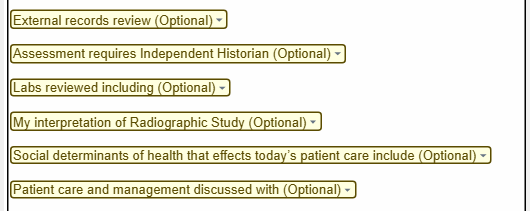
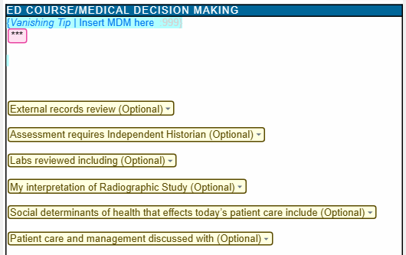
The Yellow Drop Downs
- These are listed as optional in the MDM portion of the note template but should be completed as applicable for every patient you see. It is a major component of how these notes are coded and billed by the department.
The ED Course
- The ED course can be found on the Workup tab in the patient’s chart and on the ED trackboard on the Side-by-Side view. The ED course will be pulled into your MDM when your note gets refreshed. Before there is anything documented in the ED course, it will appear as an empty blue box in the MDM – please do not delete this as it will populate upon note signing.
- This is where you should document updates in the patient’s course and allows for these updates to be time-stamped
- You can interpret lab and imaging results by clicking on the result you would like to interpret on the workup tab which will pull it into the ED course and write your interpretation comment, which will pull this result and comment into your note
Before You Leave the ED
- Once you have completed your note (HPI, physical exam, MDM, clinical impressions), please sign your note even if you are signing out and the patient’s disposition is still unknown. You can write in the end of your MDM something along the lines of “patient was signed out to oncoming team at time of shift change – please see ED course for further updates.” The person taking your sign out will document in the ED course and this will pull into your note when it comes time for the attending to cosign it.
- Notes must be completed within 12 hours of finishing your shift, but should be completed prior to leaving the hospital
- Discharge any patients who are ready for discharge. This is something that can be done after you sign out if needed.